# ProductScope AI Documentation
Frequently Asked Questions about ProductScope AI and it's tools.
## 1. What is ProductScope AI?
ProductScope AI offers **AI-powered** **Product Design & Marketing Tools** enabling e-commerce brands or marketers to quickly produce visually appealing product creatives, gain customer insights or produce SEO-optimized listing copy in seconds to amplify their reach, conversions and sales.
TL;DR you can:
📸 Create[ Instagram-worthy photos](https://app.productscope.ai/dashboard/photoshoot) for any product with the click of a button for use on social media, websites or even emails.
⚡ Gain unique[ customer Insights & craft fully Optimized Amazon listings](https://app.productscope.ai/dashboard/listing-optimizer) in seconds to improve conversions and sales.
## 2. How does the AI Photoshoot Tool work?
ProductScope’s [AI Photoshoot tool](https://app.productscope.ai/dashboard) turns boring product images into beautiful marketing assets in just seconds for social media/websites/amazon or emails. You can upload your product images and then use our AI to seamlessly transport it into any lifestyle setting of your choice either using our Pre-set themes or custom scenes.
You can also upload your own branded scenes or backgrounds to guide our AI to build “on-brand” visuals for your products. The AI Editor allows you to easily edit generated photos by removing defects/objects or even adding objects via the Magic Redraw feature. Our AI model can add shadows and reflections naturally making the end result “Instagram-ready” :)
You can find examples in our [gallery](https://productscope.ai/gallery).
Here's a [**quick demo video**](https://drive.google.com/file/d/1ZWyBGtwak7-KkEb4eHI3zkDo6CeoQmEx/view?usp=sharing) 📹
Detailed walkthrough showing how to use our AI Product Photoshoot tool can be found in this blog post:
## 3. Who is the AI Photoshoot Tool for?
Our AI Photoshoot tool can be used by any e-commerce brand or marketer irrespective of their marketplace whether it be Shopify, Amazon, Website, Etsy, etc. The output photos you generate can be used across your social media, on your website or listings and even in email as we support multiple resolutions and aspect ratios.
## 4. How does the Listing Optimizer Tool work?
Our [Listing Optimizer](https://app.productscope.ai/dashboard/listing-optimizer) is **currently only built for Amazon Sellers** (we hope to add other platforms in the near future!). It crafts product listings that are SEO optimized as well as centered around your customers’ needs and desires via unique customer insights analyzed directly from your Amazon reviews. By harnessing the power of customer reviews and demographic data, the listing optimizer will tailor your **listing’s Title, Bullets, Product Description, Subject Matter fields and Backend search terms all for you in minutes** and in a way that resonates deeply with your target audience. You can either use our AI to find your primary keywords or copy paste it from your existing Keyword Research tool of choice.
## 5. What is the Customer Insights Tool used for?
The Customer Insights Extension & Web Application grab insights across the following 6 data points:
ProductScope AI’s [Voice of Customer (VoC) Analysis](https://productscope.ai/voice-of-customer-analysis/) utilizes Artificial Intelligence to analyze Amazon reviews, transforming them into meaningful insights about customer demographics, intent, sentiment, and motivation. This provides a comprehensive Amazon voice of the customer understanding, which can help shape your product development and market positioning strategies.
1. **Customer Profile** - The "Who", "What", "Where" and "Why" for your product based on your customers reviews
2. **Pro Sentiments** - Insights showcasing the positive sentiments of the ASIN product
3. **Con Sentiments** - Insights showcasing the negative sentiments of the ASIN product
4. **Product Features** - Features of the product taken directly from customer reviews in their language
5. **Buyer Motivations** - these are the reasons the customers are buying the product
6. **Product Improvement Suggestions** - Insights into what the customers are wanting or expecting the product to include or offer in order to be valued more
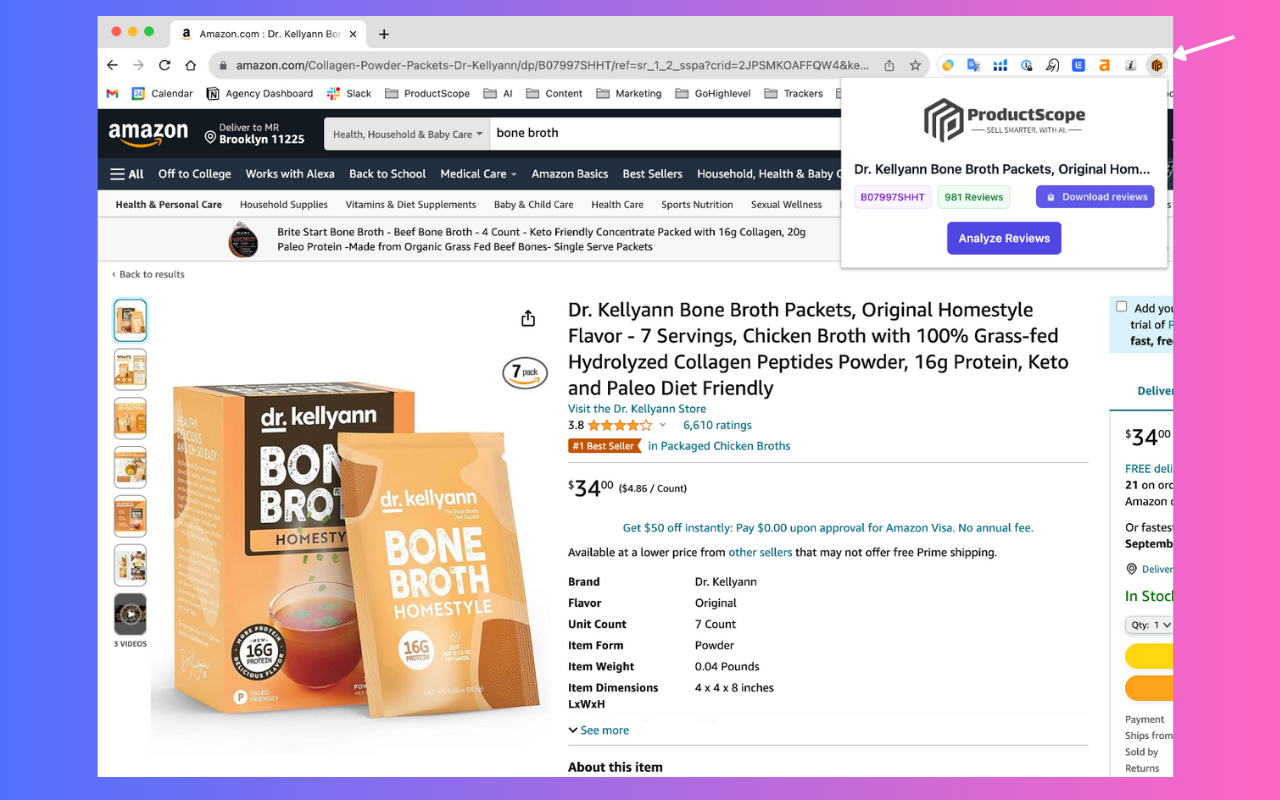
Just hop onto your Amazon.com (or .ca or .uk) product detail page (i.e., ***[www.amazon.com/dp/{ASIN}](http://www.amazon.com/dp/{ASIN})***), click on our chrome extension (it looks like an orange bumblebee), and you can run Analyze Reviews to grab your customer insights, then you can choose to open up any other web tool directly from the extension. You can also grab the Amazon main image into our AI Photoshoot tool or optimize the listing directly from the Chrome extention as its fully paired with our Web app tools!
## 6. How much does the ProductScope AI Tools cost?
You can find our latest pricing [here](https://productscope.ai/pricing).
## 7. Who owns the images, customer insights or optimized listings I generate?
You! You own the images, insights and listing copy you generate and are free to use it as you wish.
## 8. What is the free chrome extension for?
The Chrome Extension for ProductScope AI streamlines the process of gathering customer insights and product information from Amazon listings directly into its core app. It runs sentiment analysis on Amazon product reviews in order to grab unique insights such as product pros/cons, purchase motivations and product features, etc. These insights are then sent to our core app to be used within the Amazon Listing Optimizer to further enhance the product listings with these rich insights. The Extension also makes it easy to grab an Amazon product Main image directly from Amazon and bring it into our AI Photoshoot tool with a single click, making it super handy for creating lifestyle images in a flash. The Chrome Extension is completely free to use.
## 9. What If I don't sell on Amazon?
Totally fine, while all our tools are integrated they can also be purchased and used separately. Our AI Photoshoot tool is for any e-commerce brand and not limited to Amazon sellers only so you could just subscribe for the Starter or Pro AI Photoshoot plans and would only be billed for that tool.
## 10. Getting Started and what's in the Free Tier Account
You can get started with a completely free account [here](https://app.productscope.ai/create-account). Optionally if you’re an Amazon seller and would like to get customer insights or use the listing optimizer, we recommend adding our free chrome extension [here](https://chromewebstore.google.com/detail/chatgpt-for-amazon-from-p/opbmiilmogkpallllgollkihjpofjhff). (Note: only available for Chrome and Brave browsers currently).
With the Free Tier account you can get your first 40 photos or 1 Amazon Listing Optimization free.
Watch the below quick demo's to get started faster 
1. [AI Photoshoot - Demo Video](https://www.youtube.com/watch?v=DLxbJ9Oyn00)
2. [AI Photoshoot - How to Tutorial #1 Video](https://www.youtube.com/watch?v=s59raEH1KVo\&themeRefresh=1)
3. [AI Photoshoot - How to Tutorial #2 Video](https://www.youtube.com/watch?v=aB5-F8kxRl4)
4. [AI Photoshoot - Burst Mode Feature Video \[Death Wish Coffee\]](https://www.loom.com/share/105ca631d6744b7186641885ff580b9e)
5. [AI Photoshoot - Burst Mode Feature Video \[Fragrance Free Spray\]](https://www.loom.com/share/b878d47f410946a2a76dc930145177ec)
6. [AI Listing Optimizer - Demo Video](https://www.loom.com/share/ea5cc3a8499b48bb87012605de777c87?sid=3ff1924f-cd46-4689-9a2d-7e0e5f0b830c)
See you on the inside! ❤️
\
Peace, love & to better converting products,
Vijay Jacob\
Founder, ProductScope AI\
\
**P.S: Here's 2 ways I can help you today:**\
1\. Want help amplifying your brand's visibility & conversions with AI, book a call [here](https://zcal.co/productscopeai/demo-call).\
2\. Want help scaling your brand with smarter advertising on Amazon, get a [free Ad Audit here](https://fosterfba.com/case-studies/).
# Billing
We've designed our pricing to be as flexible as possible as every brand or ecommerce agency's needs are unique.
Here is our official pricing page:
# Customer Insights
Hey ProductScopeeeers,
\
Knowing what your customers think is the first step to boosting your conversion rate on Amazon.
Our **Voice of Customer Analysis tool** digs deep into your (or your competitors) Amazon reviews to unveil what your customers love and what they wish was better.
My wife is a huge Blake Lively fan, so I'll show you how to find customer insights using her Betty Buzz sparkling soda ASIN as an example in 3 easy steps! 😊
1. **I first went to her product detail page (amazon.com/dp/B0C6FQZY2F) then clicked on the orange bumble bee chrome Extension and clicked on "Analyze Reviews":**

**2. It then analyzes all 100 verified reviews on this ASIN (note we only analyze verified reviews to ensure we get an accurate representation of insights for each product) and in 30 seconds, customer insights is READY! We're going to click the "View Insights" button now.**
(*IMPORTANT: Please don't close the window or you may have to redo the process*):

**3. VOILA! - here's customer insights across 6 different datapoints based on reviews from your Target Audience (*****i.e. Customer Demographics \[What/Who/When/Why], Pros, Cons, Product Features, Customer Purchase Motivations and Product Improvement Suggestions*****)**

\
\
Your free 10 credits within this tool allow you to dive deeper into these insights (the chrome extension while free is limited to 5 conclusions per data point). Just head over to your Amazon product page and just do the above 3 quick steps to get customer insights for your products!
Cheers,
Vijay Jacob\
Founder & CEO, ProductScope AI
#### **P.S: Here's 2 ways I can help you today:**
1. Want help amplifying your brand's visibility & conversions with AI, book a call [**here**](https://zcal.co/productscopeai/demo-call)**.**
2. Want help scaling your brand with smarter advertising, get a free Ad Audit [**here**](https://fosterfba.com/case-studies/)**.**
\
# Amazon Listing Optimizer
Heyy my fellow ProductScope-eeey 👋🏽 ,\
\
Optimizing your Amazon.com listings for optimal Click-Through Rate (CTR) & Conversions will be a game-changer for your marketing dollars.\
\
Introducing the most powerful [**Amazon Listing Optimizer**](https://app.productscope.ai/dashboard/listing) - that uses smart AI that takes into account 30+ recommended guidelines for the perfect listing and makes listing refinement a breeze with just a few clicks. It marries your potent keywords with ASIN-specific Customer Insights harvested from your reviews, enhancing every aspect of your listing including backend search terms and subject matter fields.
What's crazy is through my agency, [FosterFBA](https://fosterfba.com), in the past we used to charged $200 per listing for copywriting services. Now, this tool not only slashes that cost massively, but its output eclipses our previous efforts by 2-3x, in seconds, all while resonating with your customers in their language, and aligning with their purchasing motivations effortlessly.\
\
Watch this [quick walkthrough video](https://www.loom.com/share/ea5cc3a8499b48bb87012605de777c87?sid=3ff1924f-cd46-4689-9a2d-7e0e5f0b830c) or follow along in 3 easy steps below as I show you how we'll take our usual suspect, the Betty Buzz sparkling soda ASIN, and optimize it for conversion as a live example:
(Blake Lively, if you’re reading this, hope you apply it! 😂)
1. **Open the product detail page (amazon.com/dp/B0C6FQZY2F) then clicked on the orange bumble-bee chrome Extension and click on "Optimize Listing" button:**

\
**2. It should take you to the Listing Optimizer web app and automatically plug the ASIN in the ASIN input box. Next we need to either paste our top keywords using external tools (Jungle Scout/H10/\!) and simply copy and paste it into the Keyword Bank below OR as in this example I am going to use our in-built keyword research tool and choose the Keyword Type = "Primary" and hit the 'Get Keywords' button which basically pulls all possible Primary Keywords for this listing into your Keyword bank. If it looks good hit the "Submit keywords for listing" button below:**\

**3. You're then taken to the optimize listing section of the tool and if you analyzed this ASIN before with Customer Insights using the extension, then all the boxes should auto populate and all I need to do is hit the "Re-write for me" buttons for the Title/Bullets/Description/Subject Matter Fields and Backend Search Terms:**\

**Bonus Tip:** You can hit the re-write for me button as many times as your credits allow (its 2 credits per Title/Bullets/Description/Subject Matter Fields and Backend Search Terms for a total of 10 credits for a full optimization. Once you're happy with it - press the export button and it will create a PDF file for you!
Here's what the tool recommended for their title and bullets compared to their current versions. Note this listing is using A+ descriptions so we didn't need to optimize that.

\
Peace, love & to better converting products ✌️,
Vijay Jacob\
Founder & CEO, ProductScope AI
#### **P.S: Here's 2 ways I can help you today:**
1. Want help amplifying your brand's visibility & conversions with AI, book a call [**here**](https://zcal.co/productscopeai/demo-call)**.**
2. Want help scaling your brand with smarter advertising, get a free Ad Audit [**here**](https://fosterfba.com/case-studies/)**.**
***
END OF EMAIL
# AI Photoshoot Tool
**Olá fellow ProductScope-eerr** 👋🏽 ,\
\
Here's how you can generate beautiful product photos with our **AI Product Photoshoot tool**!
Watch this [quick walkthrough video](https://www.loom.com/share/2776802c1fc24ff3a01d3af30715d395?sid=3d7bd359-b658-4324-a727-8371b3558951) or as is (now) tradition, let's use our usual suspect brand, Betty Buzz, to create a juicy photshoot picture for Blake Lively's grapefruit soda ASIN in 3 easy steps:\
1. **Open the product detail page (amazon.com/dp/B0BLXX95DQ) then clicked on the orange bumble-bee chrome Extension and click on the "AI Photoshoot" button:**\

**Bonus Tip:** *Unlimited background removals for all product image uploads: ProductScope AI automatically removes the background of your images for you whether you directly grabbed the main image from Amazon or if you manually uploaded it into your canvas. If for some reason you didn't want to remove the background, just turn the Remove Background toggle to OFF and upload your image.*
\
**2. Unlimited background possibilities: The quickest way to generate your product's background is to use one of our 21 themes (each theme typically has 10 or more images to choose from), or if you're adventurous like me - let's imagine it by click**ing **on "Custom" on the top** **left pane and typing the following prompt:**

**3. Edit the photo to your liking and download the image in the resolution you want and Voila:**

**Bonus Tip:** *The Image editor is constantly being improved but as of now you can add shadows, change saturation/colors/hue etc with lot more in the pipeline!* *ProductScope AI allows for 1024x1024 (default)* downloads *as well as larger resolutions on the paid plans.*
This was the final image I ended up with btw - what do you think? ;)

\
\
Peace, love & to better converting products ✌️,
Vijay Jacob\
Founder & CEO, ProductScope AI
#### **P.S: Here's 2 ways I can help you today:**
1. Want help amplifying your brand's visibility & conversions with AI, book a call [**here**](https://zcal.co/productscopeai/demo-call)**.**
2. Want help scaling your brand with smarter advertising, get a free Ad Audit [**here**](https://fosterfba.com/case-studies/)**.**
***
# Contact Us
Any questions that we didn't answer?
We'd love to hear from you, please contact us at
